Packxpert Return Parcel Management SOP

Created by Brendan Law Qin, Modified on Fri, 27 Mar at 2:41 PM by Brendan Law Qin


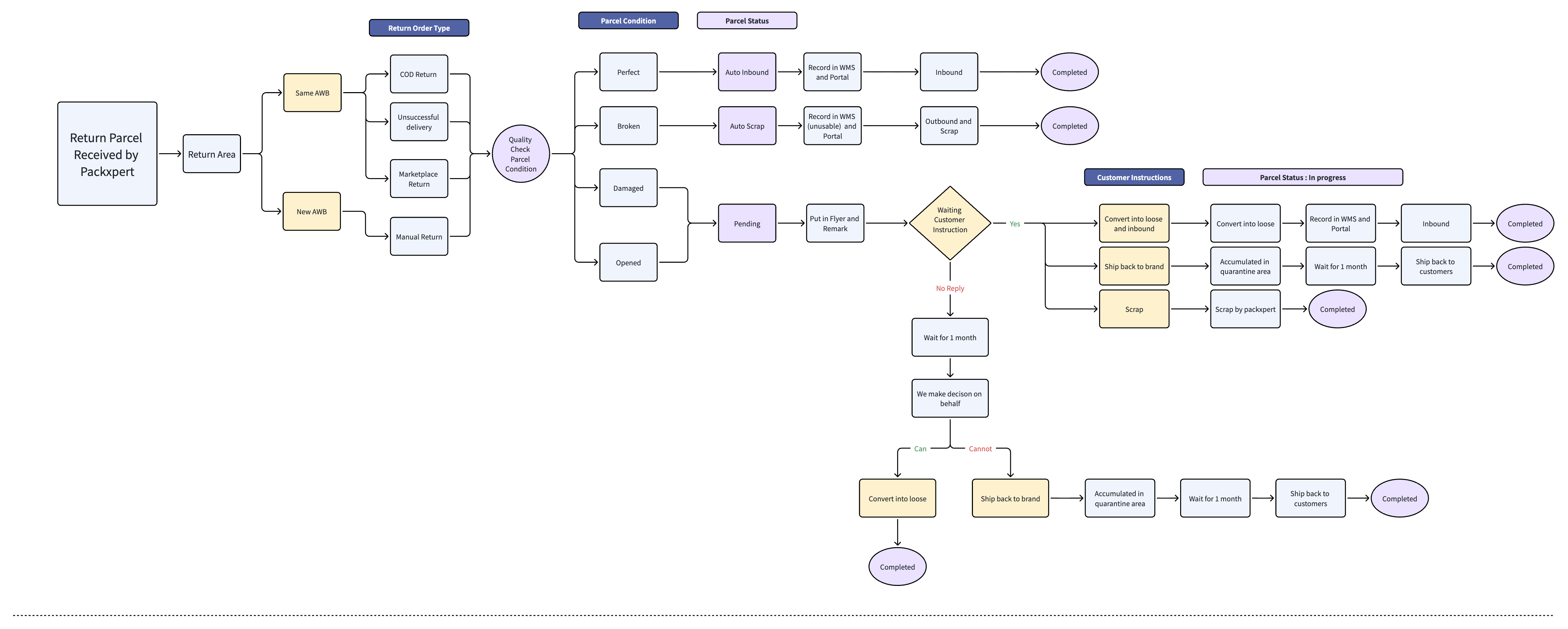
Above is the Packxpert Return Order Flowchart.

Packxpert Return Parcel Process

A. Return Parcel Process

1. Parcel Arrival

All return parcels must be placed in the designated Return Cage immediately upon receiving them.

2. Record Return Order in Return Portal

Packxpert records every return parcel in the Return Order Portal.
  • All return parcels will be recorded on the same working day they are received.


3. Awaiting Customer Instruction

The return order status will be Pending Customer Action.
Customers must choose one of the following actions:
  1. Convert into Loose & Inbound

  2. Ship Back to Brand 

  3. Scrap  


4. Customer Submits Instruction

Once the customer selects an action in the Return Portal, the order status will update become "Pending Packxpert" awaiting Packxpert action. 

5. Packxpert Execute Customer Instruction

Packxpert will execute the selected action within 48 working hours.

Actions : 

Convert into Loose & Inbound
  • Open packaging

  • Convert into loose SKU units

  • Create inbound in WMS

Ship Back to Brand
  • Record and Put the stock into Quaratine Location

  • Accumulated 30 days, pack the accumulated product and arrange ship back to brand owner

Scrap
  • Dispose items according to disposal SOP

  • Record the action in the return portal


After done executing the action, the order status will show "DONE" , indicate return order process have been complete.

 B. Return Order Types

When a return parcel arrives, it will fall under one of the following categories:

A. Same AWB Return

(Return parcel using original tracking number)
  • COD Return

  • Unsuccessful Delivery

  • Marketplace Return

B. New AWB Return

(Return parcel with new tracking number)
  • Manual Return

All returns will be recorded in:
  • Packxpert WMS

  • Packxpert Return Portal


C. Quality Check & Parcel Condition Classification

Every return parcel undergoes a physical inspection and is categorized into one of the following conditions:

1️⃣ Perfect Condition

Definition: Item received in perfect condition that is able to resell in future.
  • Item unopened

  • No damage

  • Original seal intact

→ Action: Auto Inbound

2️⃣ Broken 

Definition: Item received in very bad condition that is unable to resell or convertible to loose unit, will proceed to scrap.
  • Broken

  • Torn

  • Wet

→ Action: Auto Scrap 

3️⃣ Damaged

Definition: Item with slightly defective, pending client decision on the return items
  • Outer packaging dented

  • Able to resell after converting into loose

→ Status: Pending (Customer Instruction Required)

4️⃣ Opened

Definition: Item which packaging is opened / seal broken upon receiving, pending client decision on the return items
  • Packaging opened

  • Unseal 

→ Status: Pending (Customer Instruction Required)

D. Pacxpert Update Parcel Details in Return Portal After QC

Return Portal:

  • Parcel Details

  • Condition

  • Upload Photo

  • Update SKU Status accordingly:

    • Perfect

    • Broken

    • Damaged

    • Opened

WMS:

  • Update Return Order Status

  • Put away to correct location:


E. Customer Instruction Execution

Please refer to the Pending List. All SKUs listed under Pending status require customer action and instruction before further processing can proceed.


All parcels under Pending Action status will remain in the Pending List for up to 30 days while awaiting customer instruction.


Once the customer selects an action, the status will change to “Pending Packxpert.”


Packxpert will execute the selected action within 48 working hours.

Once marked as Pending, customers must choose one of the following:

Option 1: Convert into Loose & Inbound

  • Item converted into loose unit

  • Updated in WMS

  • Stock inbound into inventory

Option 2: Ship Back to Us (Brand Owner)

  • Items accumulated in quarantine area

  • Once ready, shipped back every month/2weeks

Option 3: Scrap

  • The item will be disposed of by Packxpert


 Packxpert will execute within 48 working hours after instruction submitted.

F. Packxpert Executing Selected Option

Option A: Convert to Loose & Inbound

  • Break bundle and convert into loose unit

  • Inbound in WMS as loose unit

  • Put away to product location


Option B: Ship Back to Customer

  • Move to “Ship Back Quaratine” Area

  • Accumulate for 30 days and arrange ship back to brands


Option C: Scrap

  • Dispose items according to disposal SOP

  • Record the action in the return portal


G. Completion Update

After action executed, status will update to Done.


H. Storage & Holding Policy

  • Pending return items will be stored in the Return Holding Area.

  • The maximum waiting time for customer instruction is 30 days.

  • After 30 days without instruction, Packxpert will proceed with a decision to prevent warehouse congestion.

  • Please select the required action under the Pending List tab within 30 days.


I. 30-Day No Instruction Policy

  • All Pending returns parcel are held maximum 30 days.

  • After 30 days:

    • Follow agreed auto-decision policy.

    • Update status accordingly.

    • Record internal remark.


Decision logic:

If convertible to loose stock:

→ Convert to loose → Inbound → Completed

If not suitable for convertible:

→ Ship back to brand


Feel free to contact Packxpert Support if you have any queries.


Was this article helpful?

That’s Great!

Thank you for your feedback

Sorry! We couldn't be helpful

Thank you for your feedback

Let us know how can we improve this article!

Select at least one of the reasons
CAPTCHA verification is required.

Feedback sent

We appreciate your effort and will try to fix the article